
These 7 AI Trends Are Sweeping the Cybersecurity Realm

Relentless digital innovation has defined the last few years, and the symbiotic relationship between AI and cybersecurity has become pivotal, especially when it comes to safeguarding sensitive information and digital assets.

As cyber threats evolve in complexity, AI has emerged as a formidable ally, empowering organizations with advanced tools and techniques that help them stay one step ahead of malicious actors.

In this exploration, we delve into cutting-edge AI trends that are reshaping the cybersecurity realm and fortifying defenses against an ever-expanding array of cyber threats.

The Rise of AI in Cybersecurity

As cyber threats grow in sophistication, traditional measures face challenges in keeping pace. This is where AI steps in, offering a dynamic and adaptive approach to cybersecurity.

Machine learning algorithms, neural networks, and other AI technologies analyze vast datasets at unprecedented speeds, identifying patterns and anomalies that might elude human detection.

58% of security professionals expect a completely new set of cyber risks in the coming years.

The integration of AI in cybersecurity doesn’t replace human expertise; it enhances it, allowing security professionals to focus on strategic decision-making while AI handles the heavy lifting of data analysis and threat detection.

AI Trends Sweeping the Cybersecurity Realm

1. Predictive Threat Intelligence

AI is revolutionizing threat intelligence by enabling predictive capabilities. Machine learning algorithms analyze historical data, current threats, and emerging patterns to predict potential future cyber threats. This proactive approach allows organizations to implement preemptive measures and close vulnerabilities before hackers exploit them.

2. Behavioral Analytics

Traditional signature-based approaches struggle to keep up with zero-day attacks and advanced “smart phishing.” However, AI-driven behavioral analytics take a different approach by focusing on understanding the normal behavior of systems and users. Deviations from these patterns trigger alerts, helping to identify potential threats based on anomalous activities rather than known signatures.

3. Autonomous Security Systems

The concept of autonomous security systems, empowered by AI, is gaining prominence. These systems can automatically detect, analyze, and respond to cyber threats in real-time, minimizing response times and reducing the impact of security incidents. The ability to automate routine security tasks enhances efficiency and allows human experts to focus on strategic aspects of cybersecurity.

4. Explainable AI (XAI)

As AI plays an increasingly critical role in cybersecurity decision-making, the need for transparency becomes paramount. Explainable AI (XAI) addresses this concern by providing insights into how AI algorithms reach specific conclusions. This enhances trust in AI-driven cybersecurity and helps security professionals understand the decisions made by AI systems.

5. Cloud Security Augmentation

With the proliferation of cloud services, securing cloud environments has become a priority. AI is being leveraged to enhance cloud security by:

  • Monitoring activities
  • Detecting anomalies
  • Responding to threats in cloud-based infrastructures

The dynamic nature of cloud environments requires adaptive security measures, making AI a natural fit for bolstering cloud security.

6. Deception Technology

Deception technology involves creating decoy assets within an organization’s network to mislead attackers. Companies are now integrating AI into deception technology to make decoys more convincing and responsive to attackers’ behavior. This helps in early threat detection and provides valuable insights into attacker tactics and techniques.

7. Zero Trust Architecture

Zero Trust Architecture, supported by AI, challenges the traditional security model, where systems trust entities inside and distrust entities outside the network. AI-driven continuous authentication and monitoring ensure that trust is never assumed, dynamically adapting access privileges based on real-time assessments of user behavior and risk factors.

Embracing the Future of Cybersecurity with AI

As the threat landscape evolves, incorporating AI in cybersecurity is not just a strategic choice; it’s a necessity. These AI trends mark a paradigm shift, enabling organizations to build more resilient and adaptive cybersecurity frameworks.

It’s crucial to stay informed and embrace the transformative power of AI, helping businesses navigate the complexities of the digital landscape with confidence and fortifying defenses against emerging threats.

AI stands as a beacon of innovation, continually pushing the boundaries of what’s possible in the realm of cybersecurity. The symbiotic relationship between human expertise and AI-driven capabilities is vital and will shape the future of data security, helping ensure a safer digital landscape for businesses and individuals alike.

Schedule a Cybersecurity Upgrade Assessment

How strong are your digital defenses against sophisticated threats? The bad guys are also using AI, leading to more dangerous phishing and network attacks. Need some help assessing your strength?

Sign up for a cybersecurity assessment to shed light on your capabilities. We can help you incorporate AI-based protection and fortify your network from attacks.

Give us a call today to schedule a chat.


Featured Image Credit

This Article has been Republished with Permission from The Technology Press.

Workspaces, a VPN & More – Learn the Newest Microsoft Edge Features

Microsoft Edge continues to redefine user experiences. This is due to Microsoft’s commitment to innovation. The latest updates bring a host of features designed to enhance productivity, security, and browsing satisfaction.

Chrome may have been number one for years, but Edge has been steadily gaining popularity. It is now the third most popular browser worldwide. Overtaking Firefox a while back, it’s now just behind Chrome (1) and Safari (2).

From personalized workspaces to a built-in VPN, Microsoft Edge is not just a browser; it’s a comprehensive toolkit for users navigating the digital landscape. Let’s delve into the newest Microsoft Edge features that promise to elevate your online journey.

A New Era of Productivity: Microsoft Edge Workspaces

Introduction to Workspaces

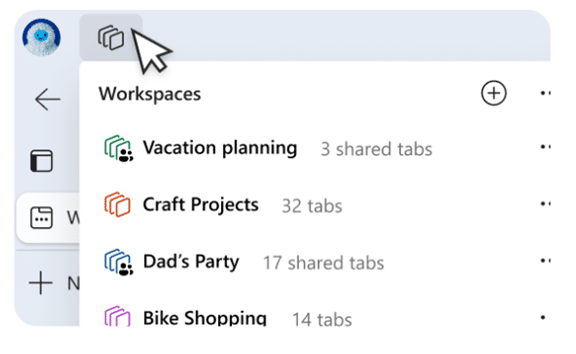
Workspaces in Microsoft Edge represent a paradigm shift in how users organize and manage their online tasks. Imagine having a dedicated space for each project, one that seamlessly integrates relevant tabs, documents, and websites.

Microsoft Edge Workspaces make this a reality. It allows users to create custom workspaces, each representing different aspects of their digital lives. Whether you’re working on a project, planning a trip, or pursuing a hobby, Workspaces offer a tailored and organized browsing environment.

Key Features of Microsoft Edge Workspaces

  1. Personalization: Users can customize Workspaces with a unique name and color, making it easier to distinguish between different projects or activities.
  2. Easy Access: With a single click, users can switch between Workspaces, instantly transitioning between different sets of tabs and online resources associated with specific projects or interests.
  3. Persistence: Workspaces keep their configurations even when users close and reopen the browser, ensuring that users can seamlessly resume their work without the need to reconstruct their customized environments each time.
  4. Efficient Task Management: Workspaces make task-focused browsing easier, minimizing distractions and helping users maintain focus on the specific project or activity at hand.

Enhanced Security with Edge Secure Network VPN

Built-in VPN

Microsoft Edge takes a giant leap in prioritizing user privacy and security with the Edge Secure Network using a new built-in VPN. VPNs, or Virtual Private Networks, encrypt internet connections, helping ensure a secure and private browsing experience. Microsoft Edge now provides users with 5GB of free VPN data per month to further protect their online presence.

Key Benefits of the VPN in Microsoft Edge

  1. Enhanced Privacy: VPNs mask users’ IP addresses, making it challenging for malicious actors to track their online activities. This is particularly crucial when accessing public Wi-Fi networks and sensitive information.
  2. Secure Browsing: The VPN has an encrypted connection, ensuring that data transmitted between the user’s device and the internet is secure, reducing the risk of interception by hackers.
  3. Geographic Consistency: Edge’s VPN will mask your specific location so that websites see a location similar to yours, ensuring you see relevant content, like movie times or nearby services. However, you cannot choose a specific region to route traffic from.
  4. Complimentary 5GB Data: Microsoft Edge users receive 5GB of free VPN data each month. To conserve the data limit, content streaming sites like Netflix, Hulu, and Disney+ aren’t routed through the VPN.

Other New Features Added to Microsoft Edge Browser

Microsoft is continuously updating Edge. Here are a few more new features you can enjoy:

  1. Autofill for Forms: Edge makes filling out forms online easier by suggesting completions when you start typing into fields, including name, email, address, etc.
  2. Web Capture: Using Web Capture in Edge makes it easy to take a screenshot, select an area or a full page, and paste it into any of your files.
  3. Copilot: Use the Copilot icon at the top of Edge to access AI features, including creating AI-generated images, quick email drafts, and more.
  4. Read Aloud: Need to step away from the screen for a moment? Let Edge read content aloud to you, enabling you to multitask like there’s no tomorrow!

Get Help Exploring Your Microsoft Services

Microsoft Edge establishes itself as a comprehensive solution for those seeking a more productivity-focused browser and a secure, private online environment. Microsoft Edge’s latest features enhance the way we work, explore, and connect.

Is your company in need of help exploring what Microsoft has to offer? From Edge enhancements to Microsoft 365 tools, we have experts to guide you.

Don’t miss out on all that these solutions have to offer. Our Microsoft experts can help set up, manage, and secure your digital workflows.

Give us a call today to schedule a chat.

This Article has been Republished with Permission from The Technology Press.
A Beginner’s Guide to Disaster Recovery: Strategies, Solutions, and Benefits

Disaster Recovery

In the realm of business, where the tide of fortune can change in an instant, lies the potential for both remarkable success and devastating failure. Picture this: a formidable disaster strikes, threatening to push your business to the brink of extinction. In such perilous moments, Disaster Recovery emerges as the guardian angel, capable of salvaging your organization from the clutches of ruin. In this article, we delve deep into the world of disaster recovery, illuminating its paramount importance and highlighting how it can reshape the destiny of your business.

Astounding statistics reinforce the urgency of disaster preparedness. According to a comprehensive study by the esteemed National Institute of Standards and Technology, an alarming 93% of businesses that lack a robust disaster recovery plan face permanent closure within a mere six months following a disaster. The financial toll is equally staggering, with the average cost of a data breach skyrocketing to $3.86 million. Additionally, each passing minute of business downtime demands a hefty price tag of $5,600. These statistics paint a stark portrait of the immense risks and potential losses that can befall unprepared organizations.

Don’t worry, because amidst these shocking numbers, there is still hope. In this article, we will explore the fascinating realm of disaster recovery. We’ll reveal its secrets and show you how it can change the fate of your business. Get ready for a story of strength, planning, and victory as we explain how disaster recovery can be the ultimate savior when your business is in danger. We’ll uncover why being prepared for disasters is crucial and share proactive steps that can rescue your business from the edge of extinction.

What is Disaster Recovery?

Disaster Recovery is the process of restoring critical business functions and infrastructure after a disaster. It involves a set of procedures and policies that help businesses recover from data loss, system downtime, and other disruptions. Disaster Recovery Planning is the proactive process of creating and implementing a plan to mitigate the effects of potential disasters.

Disaster Recovery is essential for businesses of all sizes, as it can help ensure business continuity and minimize the impact of disasters. Whether it’s a small business or a large corporation, having a Disaster Recovery Plan in place can mean the difference between surviving a disaster and going out of business.

Disaster Preparedness

Disaster Preparedness is the process of preparing for a disaster before it occurs. It involves creating a Disaster Recovery Plan, implementing Disaster Recovery Solutions, and conducting Disaster Recovery Testing.

Disaster Preparedness is crucial for businesses, as it enables them to respond swiftly and effectively when faced with a disaster. By taking proactive measures, businesses can recover quickly, reduce downtime, and mitigate financial losses. Additionally, it demonstrates a commitment to regulatory compliance, data security, and customer satisfaction, fostering trust and confidence among stakeholders. Embracing Disaster Preparedness is an investment in the long-term success and sustainability of a business.

For Example:

Imagine a retail chain that spans multiple locations, each heavily reliant on a centralized inventory management system. Recognizing the potential risks, the chain embraces Disaster Preparedness. They create a comprehensive Disaster Recovery Plan, outlining steps for data backup, alternative system access, and seamless communication channels. Implementing robust Disaster Recovery Solutions, they deploy redundant servers and establish off-site data backups. Regular Disaster Recovery Testing is conducted to validate the plan’s effectiveness. One day, a severe storm hits, causing a power outage and rendering their main server temporarily inaccessible. Leveraging their preparedness, the retail chain seamlessly switches to backup servers and accesses their off-site data, allowing stores to continue serving customers without disruption. Their quick response, facilitated by Disaster Preparedness, safeguards revenue, preserves customer trust, and solidifies their reputation as a resilient and reliable retail enterprise. This real-world example demonstrates the immense value of Disaster Preparedness in navigating unforeseen challenges and ensuring business continuity.

Disaster Recovery Strategies

Being proactive and implementing a Disaster Recovery Strategy is crucial to ensure the resilience of your business. There are various strategies available for businesses to consider:

  1. Backup and Recovery: This strategy involves regularly backing up critical data and storing it in a secure location. In the event of a disaster, the data can be restored, minimizing data loss and downtime. It is important to establish a robust backup schedule and test the restoration process periodically to ensure its effectiveness.
  2. High Availability: The High Availability strategy focuses on deploying redundant systems to ensure continuous availability and minimal downtime. This may include redundant servers, network connections, or even geographically dispersed data centers. If one system fails, the redundant system takes over seamlessly, allowing operations to continue without significant disruption.
  3. Cloud Disaster Recovery: Cloud Disaster Recovery involves leveraging cloud technology to store critical data and applications. By utilizing cloud services, businesses can benefit from the scalability, flexibility, and security offered by cloud providers. In the event of a disaster, data can be quickly restored from the cloud, enabling faster recovery and minimizing the reliance on on-premises infrastructure.
  4. Disaster Recovery as a Service (DRaaS): DRaaS is a comprehensive Disaster Recovery solution provided by third-party vendors. It combines cloud-based backup and recovery services, and automated disaster recovery processes, and often includes expertise in disaster recovery planning and management. DRaaS offers businesses a cost-effective and scalable solution without the need for extensive in-house resources and infrastructure.

For Example:

Consider a medium-sized e-commerce company heavily reliant on its online platform. They experience a major server failure due to a hardware malfunction. Without a disaster recovery plan, they would face prolonged downtime, loss of customer data, and a significant financial blow. However, due to their proactive approach and implementation of a robust disaster recovery strategy, they quickly switch to a redundant server and restore their data from backups. As a result, they minimize the impact on their business, swiftly resume operations, and maintain customer satisfaction and trust.

Disaster Recovery Solutions

To be prepared for unexpected disasters, it is crucial to implement a suitable Disaster Recovery Solution. Here are some commonly available solutions in the market:

  1. Disaster Recovery Software: This software automates the process of disaster recovery, allowing businesses to quickly recover their data and systems. It typically includes features such as data backup, replication, and restoration, ensuring efficient and reliable recovery operations.
  2. Disaster Recovery Management: This solution provides end-to-end management of the disaster recovery process. It encompasses everything from planning and documentation to implementation and testing. Disaster Recovery Management solutions help businesses streamline their recovery efforts, ensuring a comprehensive and organized approach.
  3. Disaster Recovery Consultant: A Disaster Recovery Consultant is an expert who offers guidance and support in developing and implementing an effective disaster recovery plan. They assess the specific needs and risks of a business, recommend appropriate strategies and solutions, and assist in creating a customized recovery plan.
  4. Disaster Recovery Provider: A Disaster Recovery Provider is a third-party company that specializes in offering disaster recovery solutions and services. They typically provide infrastructure, data centers, and expertise to help businesses recover from disasters. These providers may offer a range of options, such as data backup, replication, and hosting services.

When considering a Disaster Recovery Solution, businesses should carefully evaluate factors like cost, features, and complexity. It is essential to assess specific requirements, budget limitations, and expertise levels to find the solution that best suits their needs. Seeking professional advice and exploring diverse options can provide valuable insights and aid in making an informed decision. Additionally, partnering with a reputable provider like Pexo can offer the expertise and comprehensive solutions necessary for an effective disaster recovery strategy.

For Instance:

Consider a bustling restaurant that experiences a sudden fire incident, rendering its premises unusable. Without a disaster recovery solution, the restaurant would face significant downtime, loss of revenue, and potential reputational damage. However, by implementing a comprehensive disaster recovery plan that includes off-site data backups, alternative dining arrangements, and swift communication with customers, the restaurant quickly regains operations, ensures minimal disruption to its patrons, and maintains its reputation as a reliable dining establishment.

Disaster Recovery Implementation

To safeguard your business, take proactive steps to implement effective Disaster Recovery Solutions today. Disaster Recovery Implementation involves several steps, such as:

  1. Choose a Disaster Recovery Strategy and Solution that best fits your business needs and budget.
  2. Create a comprehensive Disaster Recovery Plan that outlines the steps to be taken in case of a disaster.
  3. Deploy Disaster Recovery Solutions, such as Backup and Recovery, High Availability, or Cloud Disaster Recovery.

Hot off the Digital Presses… Learn About Microsoft Copilot for Finance

Microsoft Copilot has been heading up the business AI charge. It’s used in Word, Excel, Edge, Windows, and more. This genAI-powered app is also showing up in
various function-related activities. The latest of which is finance processes.

Microsoft Copilot for Finance is a game-changer. It injects the power of next-generation AI into the heart of your everyday workflow. Imagine having an AI companion that understands the intricacies of finance as well as collaborates seamlessly with you.

It can help a seasoned financial analyst or a curious learner. It automates repetitive tasks and provides real-time insights. Copilot is poised to revolutionize how we navigate the fiscal realm.

Read on to see why this innovative tool should be on your financial radar.

What Is Microsoft Copilot for Finance?

First, let’s have an overview of this new application. Copilot for Finance is a new Copilot experience in Microsoft 365. It features AI-assisted help for financial professionals. It does this from within productivity apps they use every day.

Microsoft Copilot for Finance connects to business financial systems such as Dynamics 365 and SAP. It provides finance-based insights and guided actions in:

  • Outlook
  • Excel
  • Teams
  • Other Microsoft 365 Applications

Benefits of Using Copilot for Finance

Breaking Free from the Manual Grind

Finance professionals are drowning in repetitive tasks. These include data entry, review cycles, and report generation. Copilot for Finance throws a lifeline to finance professionals. It automates these mundane activities and frees up valuable time for strategic thinking. Imagine a world where you can focus on high-impact tasks: tasks like financial planning, risk analysis, and driving business growth.

AI-Powered Insights at Your Fingertips

Copilot for Finance isn’t just about automation; it’s about intelligence. This AI assistant learns your organization’s financial data and behavior. It surfaces insights you might have missed.

Imagine uncovering hidden trends and predicting cash flow issues as well as identifying areas for cost optimizations– all powered by AI that works seamlessly
within your existing Microsoft 365 environment.

Tailored for Your Team

Copilot for Finance isn’t a one-size-fits-all solution. It caters to the specific needs of different financial roles. Imagine streamlining audits with a simple prompt or simplifying collections with automated communication and payment plans. It can also speed up financial reporting with effortless variance detection. Copilot for Finance empowers every member of your finance team. It does this with role-specific workflows and features.

Seamless Integration for a Frictionless Experience

Copilot for Finance integrates effortlessly with your existing Microsoft 365 tools. Such as Excel, Outlook, and Teams. This means no more jumping between applications. No more struggling to import data. Imagine accessing insightful financial insights directly within your familiar workflow. This eliminates silos and streams communication across your team.

Built with Trust in Mind

Security and compliance are paramount in the world of finance. Copilot for Finance inherits the robust security features you trust from Microsoft 365. Imagine leveraging a solution that adheres to the strictest data privacy regulations. This gives you peace of mind and ensures your financial data remains secure.

A Glimpse into the Future of Finance

Copilot for Finance represents a significant leap forward in financial technology. It’s more than just automation. It’s about harnessing the power of AI to augment human expertise as well as transform the way finance operates.

Imagine a future where tedious tasks are a thing of the past. They’re replaced by a world of data-driven insights and strategic decision-making, all at the click of a button or text prompt.

Getting Started with Copilot for Finance

Microsoft Copilot for Finance is currently available for early adopters. Do you want to experience its transformative potential? Here’s how to get started:

  • Visit the Copilot for Finance website: This website provides a wealth of information. This includes product details, functionalities, and more.
  • Review Requirements: Ensure you meet the licensing requirements. These include specific Microsoft 365 subscriptions as well as browser specifics, and other guidelines.
  • Connect with Your IT Provider: We can offer support to set up Copilot for Finance. We’ll ensure it’s integrated and secured and also train your team on its helpful features.

The Future is Now: Embrace the Power of AI

The world of finance is evolving rapidly. Microsoft Copilot for Finance empowers you to embrace this change. As well as navigate the future with confidence. Copilot for Finance offers AI-powered insights, streamlined workflows, and seamless integration. It could soon become an indispensable tool for every
finance professional.

Get Expert Microsoft 365 & Copilot Guidance

AI tools in Copilot are dominating business transformations. You can join, or risk missing out on what AI has to offer. We can help you unlock the full potential of Copilot in Microsoft 365. As well as propel your business forward with AI power.

Contact us today to see how we can help your business.

Featured Image Credit

This Article has been Republished with Permission from .

A Simple Guide to the Updated NIST 2.0 Cybersecurity Framework

Staying ahead of threats is a challenge for organizations of all sizes. Reported global security incidents grew between February and March of 2024. They increased by 69.8%. It’s important to use a structured approach to cybersecurity. This helps to protect your organization.

The National Institute of Standards and Technology (NIST) created a Cybersecurity Framework (CSF). It provides an industry-agnostic approach to security. It’s designed to help companies manage and reduce their cybersecurity risks. The framework was recently updated in 2024 to NIST CSF 2.0.

CSF 2.0 is a comprehensive update that builds upon the success of its predecessor. It offers a more streamlined and flexible approach to cybersecurity. This guide aims to simplify the framework. As well as make it more easily accessible to small and large businesses alike.

Understanding the Core of NIST CSF 2.0

At the heart of CSF 2.0 is the Core. The Core consists of five concurrent and continuous Functions. These are: Identify, Protect, Detect, Respond, and Recover. These Functions provide a high-level strategic view of cybersecurity risk, as well as an organization’s management of that risk. This allows for a dynamic approach to addressing threats.

Here are the five Core Functions of NIST CSF 2.0:

  1. Identify
    This function involves identifying and understanding the organization’s assets, cyber risks, and vulnerabilities. It’s essential to have a clear understanding of
    what you need to protect. You need this before you can install safeguards.
  2. Protect
    The protect function focuses on implementing safeguards. These protections are to deter, detect, and mitigate cybersecurity risks. This includes measures such as firewalls, intrusion detection systems, and data encryption.
  3. Detect
    Early detection of cybersecurity incidents is critical for minimizing damage. The detect function emphasizes the importance of detection, as well as having mechanisms to identify and report suspicious activity.
  4. Recover
    The recover function focuses on restoring normal operations after a cybersecurity incident. This includes activities such as data restoration, system recovery, and
    business continuity planning.
  5. Respond
    The respond function outlines the steps to take in the event of a cybersecurity incident. This includes activities such as containment, eradication, recovery, and
    lessons learned.
  6. Recover
    The recover function focuses on restoring normal operations after a cybersecurity incident. This includes activities such as data restoration, system recovery, and
    business continuity planning.

Profiles and Tiers: Tailoring the Framework

The updated framework introduces the concept of Profiles and Tiers. These help organizations tailor their cybersecurity practices. They can customize them to their specific needs, risk tolerances, and resources.

Profiles

Profiles are the alignment of the Functions, Categories, and Subcategories. They’re aligned with the business requirements, risk tolerance, and resources of
the organization.

Tiers

Tiers provide context on how an organization views cybersecurity risk as well as the processes in place to manage that risk. They range from Partial (Tier 1) to
Adaptive (Tier 4).

Benefits of Using NIST CSF 2.0

There are many benefits to using NIST CSF 2.0, including:

  • Improved Cybersecurity Posture: By following the guidance in NIST CSF 2.0, organizations can develop a more comprehensive and effective cybersecurity program.
  • Reduced Risk of Cyberattacks: The framework helps organizations identify and mitigate cybersecurity risks. This can help to reduce the likelihood of cyberattacks.
  • Enhanced Compliance: NIST aligned CSF 2.0 with many industry standards and regulations. This can help organizations to meet compliance requirements.
  • Improved Communication: The framework provides a common language for communicating about cybersecurity risks. This can help to improve communication between different parts of an organization.
  • Cost Savings: NIST CSF 2.0 can help organizations save money. It does this by preventing cyberattacks and reducing the impact of incidents.

Getting Started with NIST CSF 2.0

If you are interested in getting started with NIST CSF 2.0, there are a few things you can do:

  • Familiarize yourself with the framework: Take some time to read through the NIST CSF 2.0 publication. Familiarize yourself with the Core Functions and categories.
  • Assess your current cybersecurity posture: Conduct an assessment of your current cybersecurity posture. This will help you identify any gaps or weaknesses.
  • Develop a cybersecurity plan: Based on your assessment, develop a cybersecurity plan. It should outline how you will put in place the NIST CSF 2.0 framework in your organization.
  • Seek professional help: Need help getting started with NIST CSF 2.0? Seek out a managed IT services partner. We’ll offer guidance and support.

By following these steps, you can begin to deploy NIST CSF 2.0 in your organization. At the same time, you’ll be improving your cybersecurity posture.

Schedule a Cybersecurity Assessment Today

The NIST CSF 2.0 is a valuable tool. It can help organizations of all sizes manage and reduce their cybersecurity risks. Follow the guidance in the framework. It will help you develop a more comprehensive and effective cybersecurity program.

Are you looking to improve your organization’s cybersecurity posture? NIST CSF 2.0 is a great place to start. We can help you get started with a cybersecurity assessment. We’ll identify assets that need protecting and security risks in your network. We can then work with you on a budget-friendly plan. Contact us today to schedule a cybersecurity assessment.

Featured Image Credit

This Article has been Republished with Permission from .

Why Continuous Monitoring is a Cybersecurity Must

Imagine this: you leave your house for vacation. You live in a shady neighborhood but feel confident your locks are secure, but you also don’t check
them daily. Are they really locked and safe? A tiny crack or hidden weakness could have occurred. It’s a disaster waiting to happen.

That’s the risk of neglecting continuous cybersecurity monitoring. Cyber threats are constantly evolving, and traditional security measures are no longer enough. Continuous monitoring acts as your vigilant digital guard. It’s constantly checking for weaknesses. It sounds the alarm before attackers exploit them.

Why Continuous Monitoring Matters

There are several reasons you need to watch your network. It’s not just a “good to have.” Here’s why continuous monitoring is a cybersecurity must for businesses of all sizes.

Breaches Happen Fast

Cyberattacks can happen in seconds. They exploit vulnerabilities before you even know they exist. Continuous monitoring provides real-time insights. It allows you to identify and respond to threats swiftly, minimizing potential damage.

Advanced Threats Need Advanced Defenses

Hackers are constantly developing sophisticated techniques. Some can bypass traditional perimeter defenses. Continuous monitoring delves deeper. It analyzes network traffic, user behavior, and system logs. It uncovers hidden threats lurking within your network.

Compliance Requirements Often Mandate It

Many industry regulations and data privacy laws require organizations to have continuous monitoring. Failure to comply can result in hefty fines and reputational damage.

Peace of Mind and Reduced Costs

Continuous monitoring helps prevent costly breaches and downtime. It also reduces the workload for security teams. It automates routine tasks, allowing them to focus on strategic initiatives.

What Does Continuous Monitoring Look Like?

Continuous monitoring isn’t a single tool. It’s a holistic approach that combines different elements. These include:

  • Log Management: Security logs are collected and analyzed for suspicious activity. Logs come from firewalls, devices, and applications.
  • Security Information and Event Management (SIEM): SIEM systems collect security data. They tap into various sources. They provide a centralized view of your security posture and identify potential threats.
  • Vulnerability Scanning: Regular scans identify weaknesses in your systems and applications. This allows you to patch them before attackers exploit them.
  • User Activity Monitoring: Monitoring user behavior can identify suspicious activity. For example, unauthorized access attempts or data exfiltration.
  • Network Traffic Analysis: Monitoring network traffic can reveal several risks:
    • Malware
    • Suspicious communication patterns
    • Attempts to breach your network defenses

Benefits Beyond Threat Detection

Continuous monitoring offers advantages beyond just identifying threats. Here are some extra benefits.

Improved Threat Detection Accuracy

Continuous monitoring reduces false positives. It does this by analyzing vast amounts of data. This allows your security team to focus on genuine threats.

Faster Incident Response

Continuous monitoring provides real-time alerts. This enables a quicker response to security incidents, minimizing potential damage.

Enhanced Security Posture

Continuous monitoring aids in identifying vulnerabilities. It helps you rank patching and remediation efforts. This proactively strengthens your security posture.

Compliance Reporting

Continuous monitoring systems can generate reports. This helps you prove compliance with relevant regulations. It also saves you time and resources during audits.

Getting Started with Continuous Monitoring

Implementing continuous monitoring doesn’t have to be overwhelming. You can begin with a few common-sense steps.

Assess Your Needs

Identify your organization’s specific security needs and compliance requirements. Have a cybersecurity assessment done. This is the best way to identify vulnerabilities you should address.

Choose the Right Tools

Select monitoring tools that align with your needs and budget. Consider managed security service providers (MSSPs) for a comprehensive solution. We can help you ensure a holistic cybersecurity strategy. Plus, we can tailor solutions for your budget.

Develop a Monitoring Plan

Define what your monitoring plan will look like. This helps ensure that things don’t get missed. Here are some things to include in your plan:

  • How you will track data
  • How you will handle alerts
  • Who handles responding to incidents

Invest in Training

Train your security team on how to use the monitoring tools as well as how to effectively respond to security alerts. Include training on reporting from monitoring systems. Ensure your team knows how to understand the insights they offer.

Continuous Monitoring: Your Cybersecurit

In today’s threat landscape, continuous monitoring is not a luxury. It’s a security necessity. Proactive monitoring of your systems and data has many benefits. You can identify threats early and respond swiftly, as well as reduce the impact of cyberattacks.

Don’t wait for a security breach to be your wake-up call. Embrace continuous monitoring and take control of your cybersecurity posture. An ounce of prevention is worth a pound of cure, especially in the digital world.

Need Help with Your Cybersecurity Strategy?

Monitoring is one part of a holistic approach to cybersecurity. We’ll be happy to help you protect your business. We can customize a plan that works for your needs and budget.

Contact us today to discuss your needs.